


Jira as a PSA tool and project management platform: REMIRA’s experience
Scalable efficiency with ERP integration for comprehensive project organisation at a software provider for the retail sector
What does PPE stand for?
How does Jira, as a PSA tool, fit into modern project organisations?
PSA stands for Professional Service Automation. It encompasses software tools that primarily help project-based service companies to make their services predictable, billable and economically manageable. Unlike project management software, PSA is not just about tasks and deadlines, but also about financial management.
Typical functions of a PSA tool:
- Time and effort tracking
- Resource & workload management
- Project controlling with forecasts
- Budget monitoring
- ERP-integrated project management
- Reporting & Margin Analysis
Jira is increasingly being used not only for operational management in project management, but also as a PSA tool. Jira is an excellent choice as a PSA solution, particularly in professional services, where customisation and automation are key.
PSA vs. traditional project management
Jira vs. other PSA tools

Here we provide a brief, impartial overview of the market. This is because there are many solutions available, each with a different approach:
- Specialised PSA systems (e.g. Kimble, Scoro, Mavenlink)
- ERP-integrated project modules (e.g. SAP PS)
- Traditional project management tools (e.g. Monday)
- Platform-based solutions such as Jira or offerings from Microsoft, Salesforce or SAP
The choice therefore depends on the company’s specific needs. For complex project organisations, Jira is a very suitable PSA tool, as it offers advantages in terms of flexibility and integrations.
REMIRA Use Case: Jira as a solution for project management & PSA

Initial situation: Project management without an integrated ERP connection

In light of its strong business growth, REMIRA sought to professionalise its systems. After the software company had implemented its ERP system, it was able to resolve the following issues using the PSA system:
- Time-consuming time recording
- Manual linking of project work and the ERP system
- Inconsistent project management tools in collaboration with clients

Operational project management should be integrated with commercial management. The project team had drawn up a detailed list of requirements covering both the automation functions within the ERP system and features relating to project management, resource management, project controlling, reporting, and time and activity tracking.

Time tracking directly within the project – with data transfer to the ERP system

Open architecture for integrations

Project planning with timelines, resources and Gantt charts

Multi-project & portfolio planning

Highly adaptable for complex project structures
After the team had evaluated various approaches and tools, Atlassian’s Jira emerged as the most suitable PSA tool. This is because it is the only one that comprehensively meets REMIRA’s extensive requirements, both from an operational and a commercial perspective.
- With the BigPicture extension, Jira combines complex project management and PSA
- Jira flexibly maps detailed requirements for dashboards, resource planning and time tracking
- Jira enables a powerful and flexible ERP integration
- Jira is established as the standard solution for many of REMIRA’s clients
- Jira remains adaptable and scalable in the long term

Jira has met our extensive list of requirements and is now in widespread use across our operational project business.
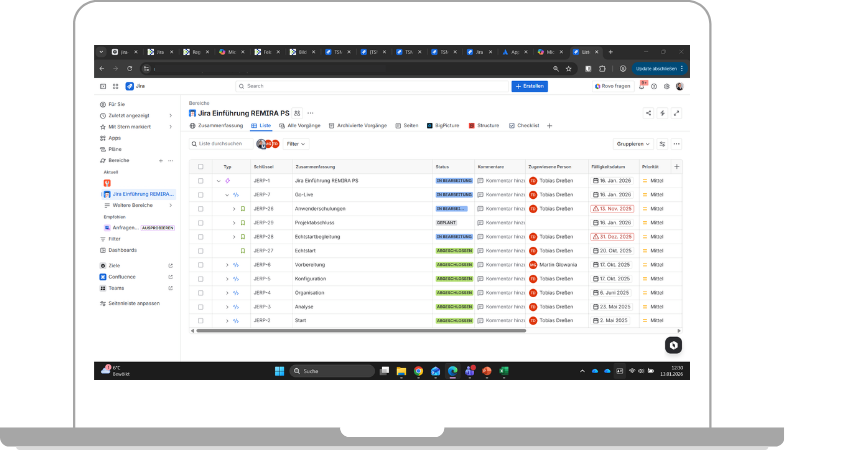
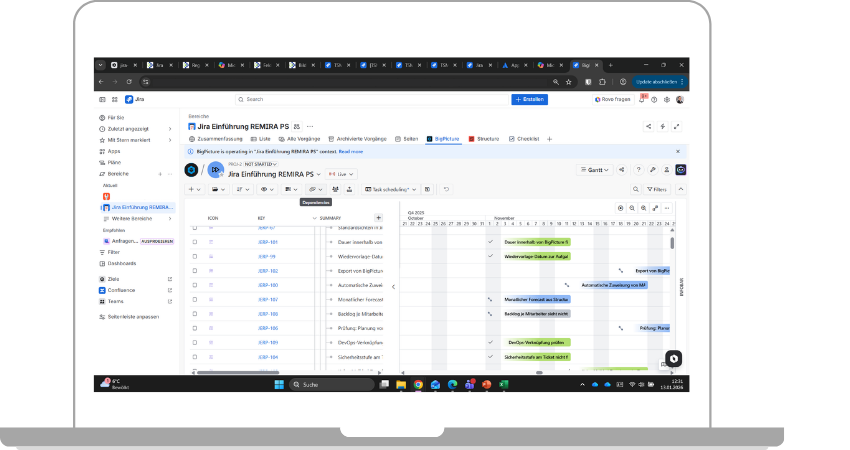
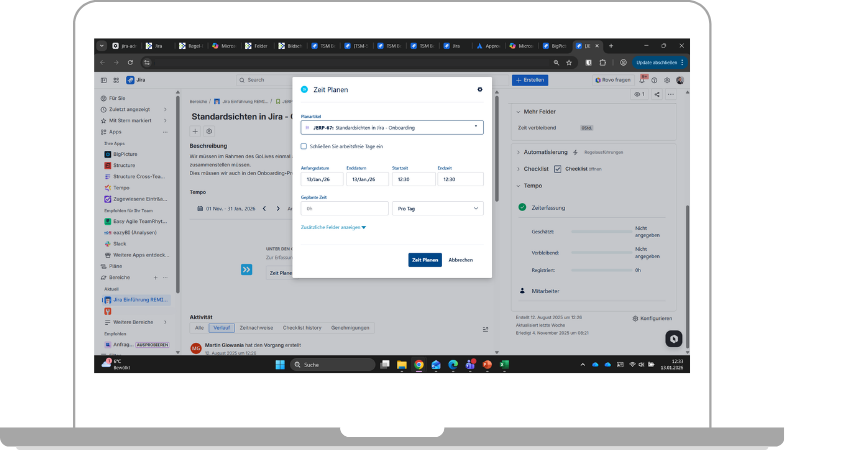
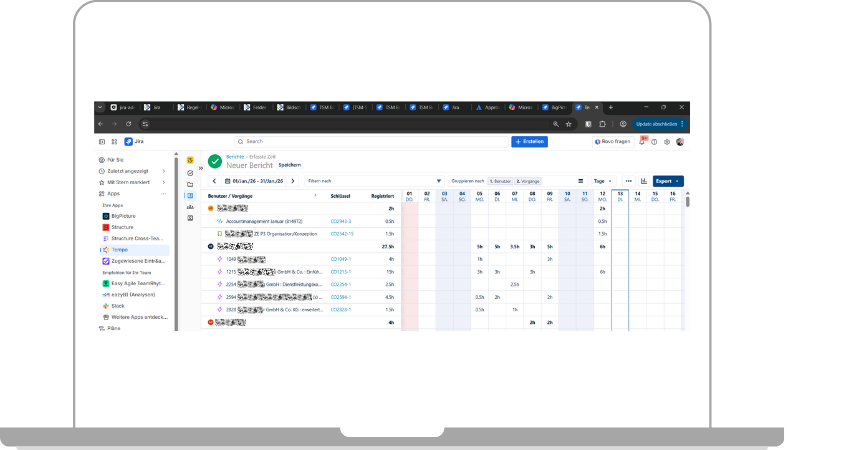
Applications used



System architecture: Clear division of roles between Jira and ERP
ERP system
Oracle NetSuite remains the leading business management system
Jira
is the operational project management and PPE platform
Project staff
are active exclusively on Jira
Automated transmission
from Jira to the ERP system: times, cost centres and project data
Implementation: Upgrading Jira to a PSA tool

As an Atlassian Solution Partner, Communardo supported the project from conception through to roll-out. Before the project began, Communardo produced a comprehensive proof of concept based on the list of requirements. During the project, the focus was on configuring Jira, including its extensions, as a comprehensive project management software solution and integrating it with the Oracle NetSuite ERP system via an external partner.
Communardo’s services at a glance:
- Strategic consultancy on Jira PSA integration
- Workshops on requirements gathering
- Ongoing project support
- Configuration of Jira, including the Tempo & BigPicture extensions
- Administrator training for sustainable operation

Both the technical implementation and the close collaboration were excellent during our Jira roll-out. Communardo really understood our requirements, scrutinised them critically and translated them into a solution that fits our organisation perfectly. This trust was crucial, particularly when dealing with such a key area as project management and ERP integration.
Jira as a PSA solution – the added benefits
Next Steps: Expansion into a control platform
Implementation of automation and portfolio management
Following REMIRA’s introduction of Jira, the PSA functionalities and basic project management features are now available within the application. Prior to the launch, REMIRA provided in-house training for project staff. This ensures that the relevant contact persons are readily available to answer any queries. REMIRA is also prepared to implement more advanced features:
- Automation to boost efficiency
- Integration of Confluence for project documentation
- Introduction of advanced project and portfolio management
- Focus on data quality as the basis for management
It is therefore clear that, at REMIRA, Jira is not merely a project management tool with an ERP connection, but is evolving into a central management platform for professional services.
Just a few weeks after the roll-out, it is already clear to REMIRA that Jira was the ideal choice as a PSA system. As a compelling alternative to traditional PSA tools, project management processes have been professionalised and further integrations are now possible.
About our client

- REMIRA is a leading provider of software solutions for supply chain management, stock optimisation and omnichannel strategies.
- Since 1994, REMIRA has been helping companies to streamline their processes across the entire value chain, reduce costs and increase customer satisfaction.
- Its portfolio includes solutions for forecasting, procurement, inventory management and integrated planning.
- REMIRA employs over 500 staff across more than ten locations in Europe.
Photo credit: The copyright for Photo 1 is held by REMIRA. We would like to thank REMIRA for their kind permission.
FAQ on Jira as a PSA tool
Absolutely – Jira is particularly well-suited when a PSA solution has to meet complex requirements.
Whilst Jira is mostly known for its strengths as project management software, its adaptability to other solutions makes it the software of choice for many organisations. Particularly in organisations with complex project structures, Jira can be set up as a powerful enterprise PSA solution through configurations and extensions.
Jira is not a traditional PSA tool ‘out of the box’, but rather a customisable platform that is particularly well-suited when:
- Projects are the key revenue driver, making multi-project and project portfolio management important
- Resource and workload management needs to be managed transparently
- Time tracking must take place directly within the project
- ERP-integrated project management is required
- Customisation for service project workflows is required rather than standard processes
Traditional PSA tools are usually off-the-shelf, turnkey solutions, whereas Atlassian takes a platform-based approach with Jira. The difference therefore lies in the system logic.
Traditional PSA tools are largely standardised, turnkey solutions with predefined processes, such as for time tracking, resource planning, project controlling or invoicing. They offer rapid implementation but limited customisability.
Jira is a platform that allows:
- processes can be freely configured
- Workflows can be customised
- Jira-ERP integration can be carried out flexibly
- Agile and traditional working methods can be combined
Whilst traditional PSA tools are usually focused on billing, Jira, as a PSA tool, combines operational project management with financial control. As a PSA tool, Jira offers greater adaptability and more integration options – but also places higher demands on design and governance. This was given careful consideration in advance during the PSA project at Remira, which was based on Jira, and the consultants from Communardo provided advice on this aspect throughout the project.
Jira and an ERP system are typically integrated via APIs or middleware solutions. In most cases, such data is synchronised:
- Project structures
- Time and activity tracking
- Cost centres
- Status information
- Data relevant to invoicing
In REMIRA’s ERP integration, the ERP (Oracle NetSuite) remains the leading financial system, whilst Jira acts as the operational project and PSA platform. This balance provides key factors for success.
A well-planned Jira–ERP integration for service companies such as REMIRA reduces manual data transfers and increases transparency in project controlling.
Times, project structures and cost centres are automatically transferred to an ERP system via APIs or middleware. Extensions are also available for some enterprise resource planning systems. In REMIRA’s client project, a specialist partner integrated Oracle NetSuite with Jira.
The initiative is likely to succeed if the introduction of Jira as a PSA tool is not viewed purely as an IT project, but if strategic decisions are also taken into account. This is because a PSA tool influences project organisation, resource management, cost-benefit analyses and reporting structures. If project management is already well established, decisions are easy to make. Otherwise, the project should be expanded to include the further development of the entire project management framework.
Success factors from the project with REMIRA were:
- A clear list of requirements from REMIRA’s specialist departments, based on defined objectives
- Proof of concept by Communardo to ensure an open tool selection
- Clear processes formed the basis for the configurations
- Early definition of the ERP architecture (clarification of roles)
- Training programme for internal key personnel
A key benefit of Jira as a project management tool lies in the interplay between operational transparency and financial control. When combined with an ERP integration, this results in ERP-linked project management, enabling project managers and the controlling function to work with consistent data.
With the appropriate configuration, Jira enables:
- Project controlling at ticket level
- Transparent capacity and workload analyses
- Budget and forecast tracking
- Early detection of variances
- Automated time tracking within the project context
This provides managers and C-level executives with greater margin transparency, well-founded forecasts and a robust basis for decision-making.
It is not possible to estimate the duration of a Jira PSA implementation as a standard, as it depends heavily on the following factors:
- Scope of integration
- Organisational maturity
- Number of stakeholders
- Complexity of the ERP integration
As a guide, we can provide the following timeframes:
- Smaller set-ups without complex ERP integration: 3–4 months
- Medium-sized organisations with ERP integration: 6–9 months
- Enterprise environments with a multi-project and portfolio focus: 9–12 months
At REMIRA, the PSA project took 6 months from the technical project kick-off to go-live. All requirements were clarified in advance and the tools were critically assessed. As REMIRA does, we recommend developing the PSA platform iteratively. Following the implementation of the key core functionalities, REMIRA will introduce automations after go-live and a familiarisation phase for staff, and will subsequently implement portfolio management.
Our satisfied customer

Are you looking for a project management solution that can do even more?
Our experts would be happy to show you Jira’s features and its versatile integration options. Get in touch with us. Together, we’ll explore how your project organisation can be set up more efficiently and cost-effectively.

Your contact person
Marlen KaiserWe're happy to help you
- Kleiststraße 10a, 01129 Dresden, Germany
- Tel: 0800 8 776 776
- sales@communardo.de